
How to Tell If Your Fingerprint Rolls Are Good Enough for ATF
Learn how to evaluate your rolled fingerprint card for ridge detail and common rolling errors, and how to use our free online NFIQ quality check tool.
Checking your own fingerprint card is straightforward and can easily be done from home. The goal is simply to make sure your prints are clear and readable so the FBI's automated matching system can process them without delay. This guide covers two simple ways to verify your card: a quick visual inspection at your kitchen table, and running a free NFIQ quality check (the standard metric used in the biometric community) directly on SLAP & ROLL before you pay anything.
What a usable print looks like
Hold a finished card under an even, bright light. For each of the ten rolled boxes, look for three things:
- Ridge separation. The ridges are distinct black lines with clear white valleys between them. If the print is a solid black shape with no visible ridge structure, it's over-inked. If it's a faint, ghostly outline with no contrast, it's under-inked.
- Full nail-to-nail coverage. The print extends across the full width of the finger, from one nail edge to the other. A rolled print that only covers the pad of the finger is incomplete. The FBI's automated matching system looks at minutiae across the entire fingerprint surface; half a print is half the information.
- No smearing or double-printing. Ridges run in clean, single lines. A smeared print shows ridges trailing off to one side; the finger was dragged on lift. A double-printed finger shows two print impressions overlaid slightly offset - the finger touched the card twice during the roll.
The FBI's public guidance for what makes a recordable fingerprint lives at Recording Legible Fingerprints. It's the same standard law-enforcement booking officers are trained to.
Pressure is the thing most first-time rollers get wrong
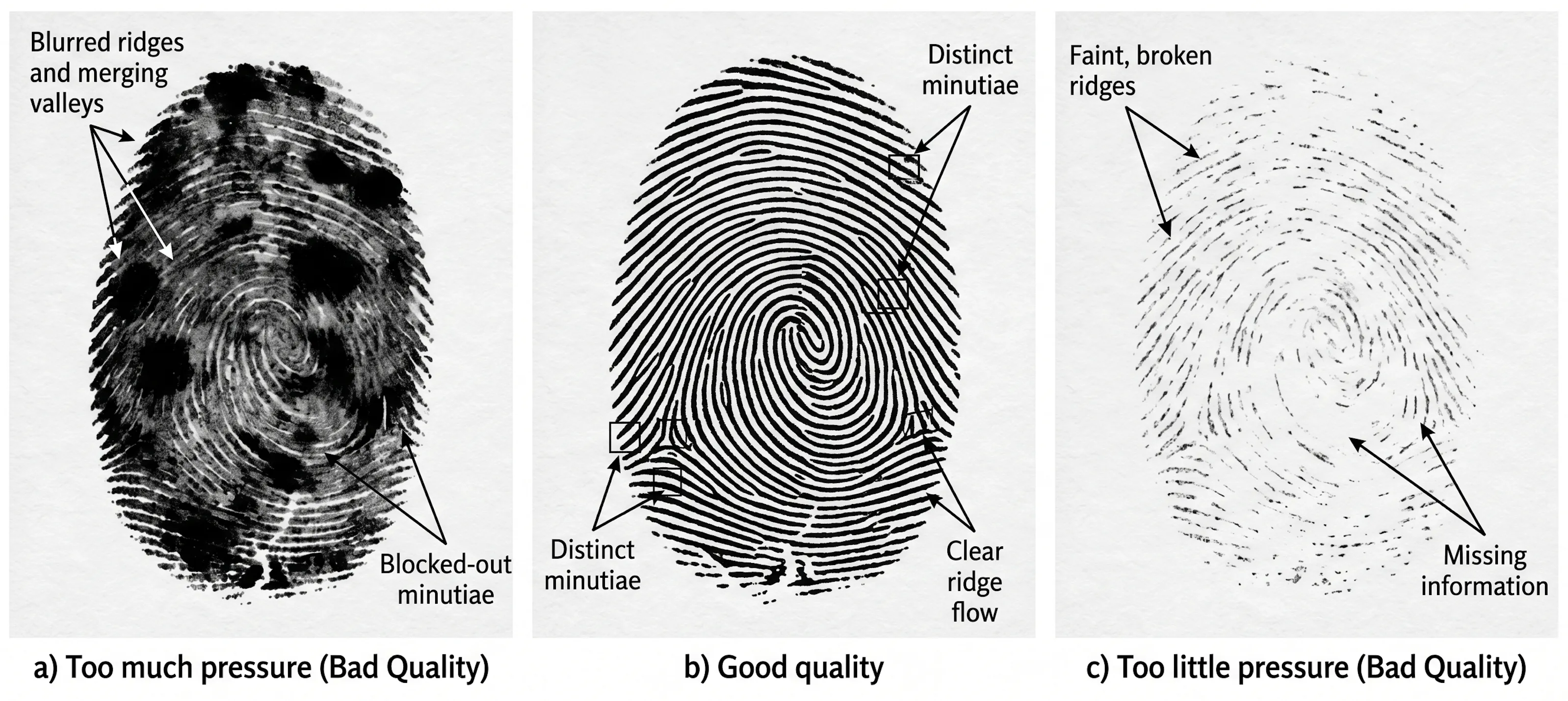
Getting the pressure right is the most important factor in capturing clean prints. The three panels above show how too much or too little pressure affects the scan quality compared to a correct roll.
- Too much pressure (left panel). Ridges merge into blocked-out shapes. The individual ridge lines disappear into solid black regions because the finger was pressed hard enough to push ink out of the furrows and into the whole surface. The matcher can't find the ridge endings and bifurcations (the minutiae) it needs to identify the print.
- Good pressure (center panel). Ridges are distinct and continuous. The valleys between them are clean white space. Minutiae are visible across the full nail-to-nail width. This is what a print looks like when the finger is inked evenly and rolled with the weight of the hand and nothing more.
- Too little pressure (right panel). Ridges come out faint and broken. Whole areas of the print are missing information. The matcher treats these gaps the same way it treats a smudge: as an area it can't read.
Pressure is usually the culprit. Over-inked prints require a lighter touch; under-inked prints require firmer, more even pressure. The weight of a relaxed hand, moving in one continuous roll from nail edge to nail edge, is usually enough to find the middle ground. Details on the rolling motion itself are in How to roll your own fingerprints on an FD-258 card.
The common failure modes
Six patterns account for almost every unusable card. Each one is visually distinguishable once you know what to look for.
- Over-inked (blocked-out). Solid dark regions where ridges have merged. Matches the left panel above. Remedy: blot the inked finger once on scrap paper before placing it on the card.
- Under-inked (faint). Washed-out, partial, or broken ridges. Matches the right panel above. Remedy: re-ink with firmer, even pressure across the whole finger and confirm the ink pad itself isn't dried along its edge.
- Smeared. Ridges trail off to one side in a comet-tail pattern. Caused by lifting the finger sideways instead of straight up. Remedy: lift straight up, and hold the card down so it can't shift during the roll.
- Double-printed. Two print impressions overlaid, slightly offset. The finger touched down twice during the roll. Remedy: one slow, continuous motion from nail edge to nail edge, then a clean vertical lift.
- Incomplete (pad-only). The print covers the center of the finger but not the sides. The finger was placed flat and not rolled. Remedy: start with the nail edge turned inward, end with it turned outward - the pad is the midpoint of the roll, not the endpoint.
- Missing areas (scars, cuts, dry skin). Sections of the print genuinely don't have ridge detail to record, because the skin itself is missing structure there. Not all of these are fixable. Hydrating dry skin with a thin film of water and blotting dry before inking helps; scars and cuts don't.
A card with one or two fingers showing any of these patterns is fixable. The correction method is covered in the rolling guide: a small white office label over the bad print, a re-roll on top of it, lined up inside the box.
Why a visual check isn't enough
Some prints look reasonable to the human eye and still score poorly, because the question the FBI's matcher asks is not "does this look like a fingerprint" but "can I extract enough minutiae to identify this person with confidence". A print can have visible ridges across the whole finger and still be missing the specific ridge endings and bifurcations the matcher needs, or have them positioned in a pattern the matcher considers ambiguous.
This is where NFIQ comes in. NFIQ (NIST Fingerprint Image Quality) is a NIST-developed algorithm that scores how well an automated matcher can work with a print, not how it looks to a human. That's the difference between "this card looks fine" and "this card will match reliably," and it's the check you can't do by eye. For the scoring scale, the NFIQ 1 vs. NFIQ 2 distinction, and where the score lives inside your EFT file, see Understanding NFIQ scores.
The free NFIQ quality check
SLAP & ROLL computes an NFIQ score on every fingerprint from your scanned FD-258 card and shows the results before you pay. The workflow:
Scan the card
600 DPI, grayscale, PNG. Full scanner-settings walkthrough at What DPI do I need to scan a fingerprint card?
Upload the scan
Upload at the dashboard. No payment is required to run the quality check.
Review the per-finger scores
Each print on the card is segmented, scored, and color-coded on the processed card image. Green is reliably matchable. Amber is acceptable. Red is the lowest class on the scale and the one most worth a second look.
Decide what to do
If the card looks good and the scores look good, generate the EFT file. If a finger or two is red and re-rolling is a quick fix, roll a fresh card and re-upload. The quality check is free and can be run as many times as you want. If the whole card is scoring low, check the scan first (under-resolved scans score artificially poorly), then look at technique.
The algorithm under the hood is NIST's NBIS NFIQ 1 implementation, which is the same standard quality score utilized by the FBI. The score displayed on your dashboard is the exact number written directly into your EFT file. We do not invent a proprietary "quality rating" or dress it up with a thumbs-up icon.
How to read the result
NFIQ is a predictor, not a verdict. The ATF eForms portal does not reject a submission because a finger scored a 4, and the FBI's matcher doesn't pass or fail a card on the NFIQ number itself. The score tells you how likely each print is to match; the matcher makes the actual call.
Practical read:
- Whole card in green or amber. Nothing to act on. Generate the EFT file.
- One or two red fingers on an otherwise clean card. Fine in most cases, especially on small-area fingers like pinkies, which score 5 for many people because there's less ridge surface to read. If re-rolling those fingers is a quick fix, it's worth doing. If not, submitting is reasonable.
- Most of the card in red or amber. Something is wrong upstream. Usually the scan (re-scan at 600 DPI grayscale and re-upload before re-rolling), sometimes the ink pad (dried-out edges produce under-inked prints), sometimes the rolling pressure (see the three-panel comparison above).
Aim for high quality. Don't fret over a few low scores. The goal of seeing the scores before you pay is to give you the option to act on the ones that matter, not to send you back to the rolling pad over a single 5 on a pinky finger.
What happens when the scores come back low
The ATF eForms portal accepts the EFT file based on format, not on NFIQ. If the file is EBTS-conformant, the portal takes it. In current practice, the eForms system processes submissions across the full range of NFIQ scores. Cards with multiple red scores (including a score of 5 on every finger) are routinely accepted, and we have directly observed submissions clear with prints that are visually marginal. A low score on a few fingers, or even the entire card, is not a reason to worry about your submission being rejected.
The quality check isn't a rejection screen. It's a confidence signal and a free iteration loop. Every finger in the green is a finger the FBI matcher is more likely to resolve cleanly; every finger in the red is one you have the option to improve before paying, not a warning the file won't be accepted. Re-scan at a higher resolution, re-roll a finger that was clearly smeared, or confirm you're happy with what you have and move on.
This is the differentiator the rest of the category doesn't offer. Livescan operators, kiosks, and mail-in services produce an EFT file and hand it over without showing you the per-finger quality scores that are about to be written inside it. No other path gives you a pre-pay readout of what your prints look like to the FBI's own quality algorithm. The readout is free, and you can re-upload as many times as you want.
Aim for high quality regardless. Policy can change, the FBI matcher reads clean ridges more reliably, and a re-roll at your kitchen table is always cheaper than re-rolling after the fact. For reference on what the FBI itself considers a recordable print, the Recording Legible Fingerprints page is the primary authority. The visual standard described there is the standard the NFIQ algorithm was calibrated against.
Before you submit - a quick checklist
Run this before generating the EFT file:
- All ten rolled print boxes filled. All four slap impression areas filled. Fourteen positions total.
- Ridges visible under bright light across the full nail-to-nail width of each rolled print.
- No solid black blobs, no comet-tail smears, no double-printed ghosts.
- A scan uploaded to the dashboard, with NFIQ scores reviewed for every finger.
- Any red-scoring finger that can be easily re-rolled has been re-rolled on a fresh card, or consciously accepted as a known outlier.
When the visual check and the NFIQ check both look right, the card is ready.