
How to Edit an EFT File: Fix a Typo, Change Your Address, or Update Your Name
Learn how to decode, edit, and re-export your EFT fingerprint files with our free online EFT editor. Easily correct typos, change addresses, or update names.
An EFT file is not a locked or encrypted file. It contains your biographic information (name, address, date of birth, SSN, and a few other fields) alongside the compressed fingerprint images, all packaged to the FBI's EBTS specification. If you catch a typo in your name, a wrong ZIP code, or you moved after getting your EFT file, the biographic half of the file can be edited and re-exported without touching the fingerprints. This guide covers what our free EFT editor can and can't do, walks through the workflow, and flags the cases where you need to re-roll rather than re-type.
What the free EFT editor does
SLAP & ROLL runs a free, browser-based EFT viewer and editor at slapandroll.com/editor. No account, no sign-in, no payment.
It parses any EFT file built to the FBI EBTS specification - including files generated by other services and livescan kiosks - and lets you modify a specific set of biographic fields. The fingerprint images themselves are preserved unchanged: the editor reads them, displays their metadata, and writes them back into the exported file bit-for-bit.
Everything happens inside your browser. The file you drop in never leaves your device. You can disconnect from Wi-Fi after the page loads and the editor will still work. The entire parsing, editing, and export process runs locally in your browser.
When you can fix an EFT file - and when you have to re-roll
The editor covers the biographic record. It does not re-capture fingerprints. Which means the answer depends entirely on what field is wrong.
You can fix it in the editor if the change is:
- A last-name change (marriage, divorce, or court-ordered name change)
- A wrong or outdated address (street, city, state, or ZIP)
- A country-of-citizenship change
- A weight or hair-color correction
You need to re-roll (or re-generate the EFT) if the mistake is:
- A wrong first name or middle name. Only the last name is editable - if your given names are wrong on the file, the EFT has to be re-generated from the original card scan.
- A wrong date of birth, place of birth, sex, race, height, eye color, or SSN. These fields are locked in the editor and in the EFT record itself; editing them opens too many ways to file a record that belongs to a different person.
- Wrong fingerprints, smeared prints, or a mismatched record type (Type-4 vs. Type-14). Fingerprint data is not editable. Type-4 and Type-14 are the two EBTS record formats used in EFT files - Type-14 uses variable-resolution capture; Type-4 uses fixed 500 PPI. Both are accepted by the ATF eForms portal; neither can be corrected by re-typing.
If the fields that need to change are in the locked set, the fastest path is usually to generate a new EFT from your original card scan using the normal paid flow. If you still have the scan, running it through the SLAP & ROLL dashboard takes about two minutes. See How to convert an FD-258 fingerprint card to an EFT file at home for the full walkthrough.
The workflow
Four steps. About a minute end-to-end.
Open the editor
Go to slapandroll.com/editor. The page loads a brief "PREPARING OFFLINE MODE" indicator while the browser-based editor loads. Once it finishes, you can disconnect from the internet if you want. The editor will keep working.
Drop in your EFT file
Drag your .eft file onto the upload zone, or click to browse. The editor accepts
any EBTS-conformant EFT file - ones we generated, ones from kiosks, ones from mail-in services,
ones from other DIY tools.
Parsing is local. The file is read into browser memory and decoded by the same engine that generates new EFT files. If the parse fails, you'll see an error at the top of the page. This usually happens if the file is corrupted or was written by a non-compliant generator.
Find the field to edit
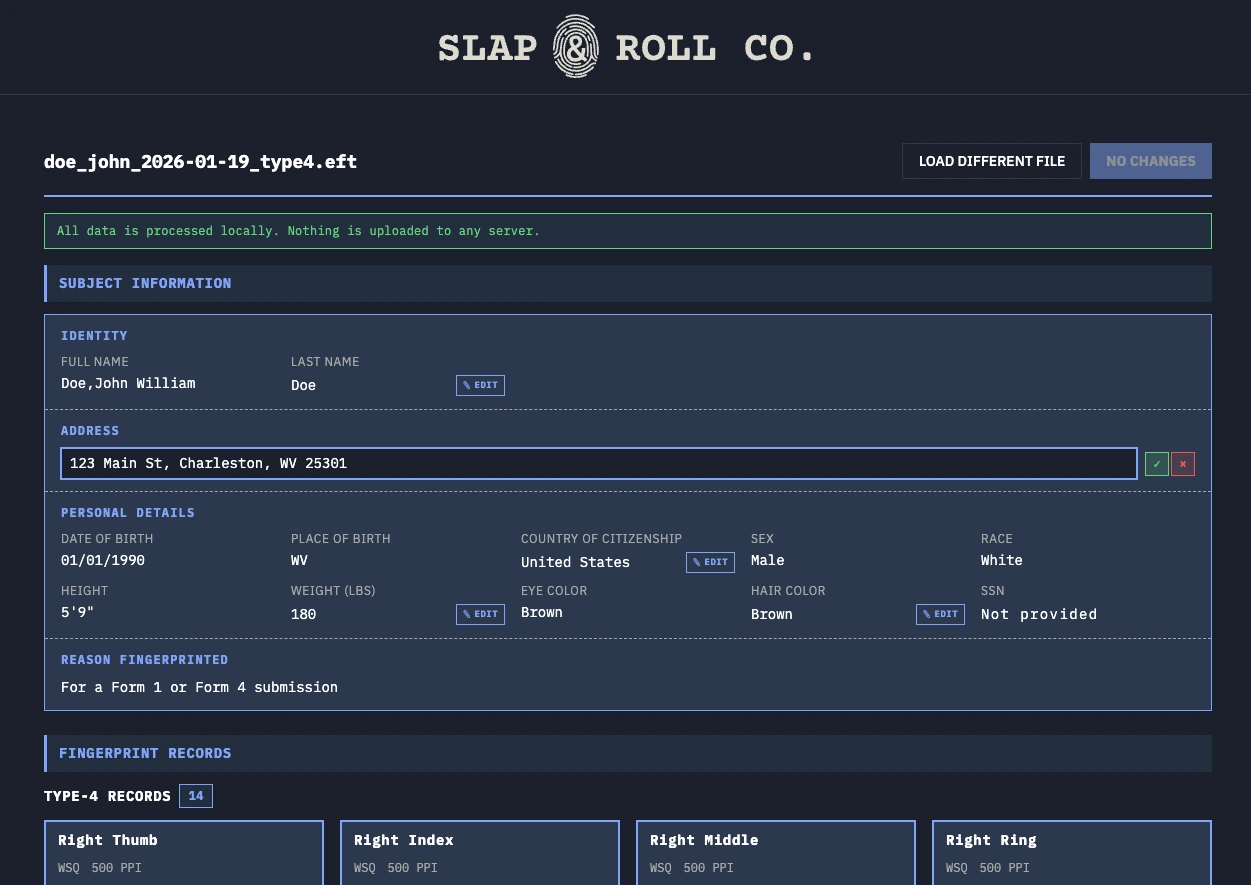
You'll see a header with the filename, a privacy reminder ("All data is processed locally. Nothing is uploaded to any server."), and two sections:
- SUBJECT INFORMATION - your biographic fields, grouped into IDENTITY, ADDRESS, PERSONAL DETAILS, and REASON FINGERPRINTED.
- FINGERPRINT RECORDS - a read-only list of the Type-14 and Type-4 records in the file, with metadata for each finger position (compression algorithm, resolution, NFIQ score where available).
Fields with a small EDIT button next to them are editable. Fields without one are read-only. If the field you need to change doesn't have an edit button, see the previous section - you need to re-generate the EFT rather than re-type it.
Edit the field and download
Click EDIT next to the field. The value turns into an inline input (or a dropdown, for country of citizenship and hair color). Type or select the new value. Click the green check to save, or the red × to cancel.
The download button at the top right is disabled until you make a change. Once you edit anything, it becomes DOWNLOAD MODIFIED EFT. Click it.
The browser saves the file as MODIFIED_<your-original-filename>.eft.
This is your edited EFT file. Upload it to the ATF eForms portal as you would any other
EFT, or hand it off to whoever is filing on your behalf.
What you can edit
The editor exposes the following fields for editing. Each corresponds to a specific field inside the EFT's Type-2 biographic record:
| Field | What changes | Typical reason |
|---|---|---|
| Last name | Replaces the surname portion of the full name | Marriage, divorce, or other legal name change |
| Full address | Replaces the entire address string | Moved, typo in street or ZIP, corrected city name |
| Country of citizenship | Replaces the citizenship code | Naturalization completed between rolling and filing |
| Weight | Replaces the weight (pounds) | Significant change since rolling the card |
| Hair color | Replaces the hair-color code | Field correction; less common but supported |
Every other biographic field - full name first/middle portions, date of birth, place of birth, SSN, sex, race, height, eye color, and reason fingerprinted - is displayed for verification but locked for editing.
What you can't edit, and why
The locked fields are not an oversight. Several are locked because they can't be silently changed without invalidating the identity represented by the fingerprints on the file:
- SSN, date of birth, place of birth, sex, race - used by the FBI's CJIS matcher alongside the fingerprint images. An editable SSN on a free tool is also an invitation for misuse, and we don't want that liability or that usage pattern attached to SLAP & ROLL.
- First name and middle name - split out from the full name field in ways that vary by generator. Rather than ship a brittle editor that mishandles edge cases, we support last-name edits only and point everyone else at re-generating the EFT.
- Height, eye color - rarely the field that's wrong. Kept read-only to keep the editor's surface area small and predictable.
- Fingerprint images, record types, quality scores - fundamentally not editable. Re-capture is the only fix.
If a locked field is wrong, you have two options:
- Re-generate the EFT from your scanned card. Fastest if you still have the scan. Costs $20 (PAYG) or nothing extra on Pro.
- Re-roll a new card and scan it. Only necessary if the fingerprints themselves are the problem, or you don't have the original scan.
For the re-generation path, see How to convert an FD-258 fingerprint card to an EFT file at home.
Common scenarios
Your last name changed
Marriage, divorce, or a court-ordered name change after getting your EFT file and before filing the eForm. Edit the Last Name field to your current legal last name and download. Fingerprints don't need to change.
If your first or middle name is what needs to change, the editor can't help - only the last name is editable. Re-generate the EFT from your card scan with the corrected name, or roll a new card if you no longer have the scan.
You moved after getting your EFT file
This is the most common reason to use the editor. The address on the EFT should match your current address on the eForm, not the outdated one in your original EFT file. Edit the Full Address field to your current address (street, city, state, ZIP) and re-download. Fingerprints don't need to change.
You got naturalized after getting your EFT file
Update the Country of Citizenship dropdown to reflect your current status. Keep the supporting documentation handy for the eForm itself - the EFT edit reflects the change; it doesn't prove it.
The original EFT was generated by someone else (a kiosk or mail-in service)
The editor works on any EBTS-conformant EFT, not just ones we produced. Drop in the file. If it parses, the supported fields become editable. If it doesn't parse, the generator produced a file that doesn't conform to EBTS - which is a problem the editor can't fix and the ATF eForms portal will likely reject anyway.
You're worried about "tampering"
Editing the biographic record of an EFT file you own is not tampering. The EBTS specification is a file format, not a signed chain-of-custody document. The ATF eForms portal validates that the file is well-formed and that the fingerprints match the applicant's record during the background check - neither of those steps is affected by correcting a typo in your own address.
What you can't do is submit a file that misrepresents who you are. That's a fraud question, not a file-format question, and no tool changes it.
A note on privacy
The editor follows the same privacy architecture as the rest of SLAP & ROLL: PII stays on
your device. The .eft file you drop in is read into browser memory, modified in place
when you edit a field, and downloaded back to your computer. There is no upload, no analytics on file
contents, and no logging of names or addresses.
You can confirm this by opening your browser's network tab before dropping in the file and watching no outbound requests fire during parsing, editing, or download. It is by design and is built using the same secure, local processing architecture as our main application flow.
Why we offer this for free
Editing an EFT file is a five-minute job for our software. Some services charge $5–10 per edit. We don't - most edits are honest corrections, and nickel-and-diming applicants over a changed address isn't a business we want to be in.
If you need to re-generate rather than edit, see How to convert an FD-258 fingerprint card to an EFT file at home. For a deeper look at what's inside the file you're editing, see EFT file format explained.