How to Offer Fingerprint-to-EFT Service in Your Gun Shop (Without a Kiosk)
Learn how to offer profitable fingerprint-to-EFT file conversion services in your gun shop using a standard flatbed scanner instead of a costly kiosk.
Your NFA customers need EFT files to submit eForm 1 and eForm 4 applications. Usually, this means driving to a livescan location, mailing paper fingerprint cards to a conversion service, or using an expensive in-store kiosk. For shops handling fewer than 10 NFA transfers a month, a kiosk rarely makes financial sense. SLAP & ROLL provides an alternative. This guide covers how to set up an in-house fingerprint-to-EFT service using standard office equipment.
What your customers need
Submitting an ATF eForm 1 (to make an NFA item like an SBR) or eForm 4 (to transfer a suppressor or SBR) requires submitting electronic fingerprints as an EFT file. This file format standardizes biometric and biographic data according to the FBI's Electronic Biometric Transmission Specification (EBTS).
Three options exist for customers to obtain these files:
- Third-party livescan. The customer drives to a livescan location, pays $65–85, and waits 30 minutes to three business days. This option requires a long drive if your store is far from metro areas, introducing friction and delays.
- Kiosk. A hardware station costing between $2,000 and $5,000. These systems lock you into a single vendor ecosystem and are difficult to justify for low-to-medium-volume dealers.
- SLAP & ROLL. Scan paper FD-258 cards on a flatbed scanner, upload them to SLAP & ROLL, and download the completed EFT file immediately. This allows customers to submit their eForms while still in your store.
Equipment requirements
Existing office equipment
- A computer with a web browser - Chrome, Firefox, Edge, or Safari. Runs entirely in the web browser. No local installation is required.
- An internet connection - Used to upload the scanned card image. (Biographic data entry and EFT file assembly happen entirely offline in the browser to protect privacy).
Additional requirements
- FD-258 fingerprint cards - Two options:
- Print your own (free): Download our printable FD-258 template and print on standard paper. Since SLAP & ROLL only processes the fingerprint blocks and ignores the demographic header, you do not need to fill out the top of the card. This minimizes paper-based personal data in your shop.
- Buy pre-printed cards (~$0.25–0.50 each in bulk): Standard FBI FD-258 cards from law-enforcement supply vendors or Amazon. Buy in packs of 50–100. These are familiar to customers, but you can leave the demographic fields blank.
- A flatbed scanner - Any flatbed scanner or office multi-function printer (MFP) capable of scanning at 600 DPI (the standard for fingerprint capture). Budget models like the Canon CanoScan LiDE 400 or Epson Perfection V39 are highly reliable and cost under $100.
- An ink pad (~$10–15) - A standard fingerprint ink pad (such as Porelon) lasts for hundreds of cards. Only needed if you are rolling prints in-store.
- Paper towels and hand sanitizer - For customers to clean up after rolling.
See also: what DPI do I need to scan a fingerprint card?
Step-by-step workflow
Get a completed FD-258 card
Two scenarios:
In-store rolling. Provide the customer with a blank FD-258 card (printed template or pre-printed card) and a fingerprint ink pad. Have them roll their prints on a stable, flat surface. If using our printable template, they only need to roll the prints—you can leave the biographic header blank, keeping paper-based PII out of your store records.
Customer-provided cards. If a customer brings a completed FD-258 card from a local sheriff or law enforcement agency, skip directly to scanning. No ink or rolling is required on your end.
Tips for your staff:
- Watch for common errors: excessive ink (smudged ridges), insufficient ink (faint patterns), or sliding during the roll (smeared ridges).
- Verify that prints are placed in the correct boxes.
- While the ATF eForms portal does not currently reject submissions based on quality scores, clean prints ensure reliable processing by the FBI matching system. Getting clean prints during the visit is faster and cheaper than dealing with potential delays later.
Share this with customers who want to practice first: how to roll your own fingerprints.
Scan the card
Place the completed FD-258 card face-down on your flatbed scanner. Set the scanner to:
- Mode: Grayscale
- Resolution: 600 DPI
- Format: PNG or TIFF
Save the scan to your computer. See also: detailed scanner settings guide.
Upload and check quality
Log in to slapandroll.com, click "Process New Card," and upload the scan. Within seconds, the software highlights every detected print on the card and calculates a standard NFIQ quality score (1 = excellent, 5 = poor).
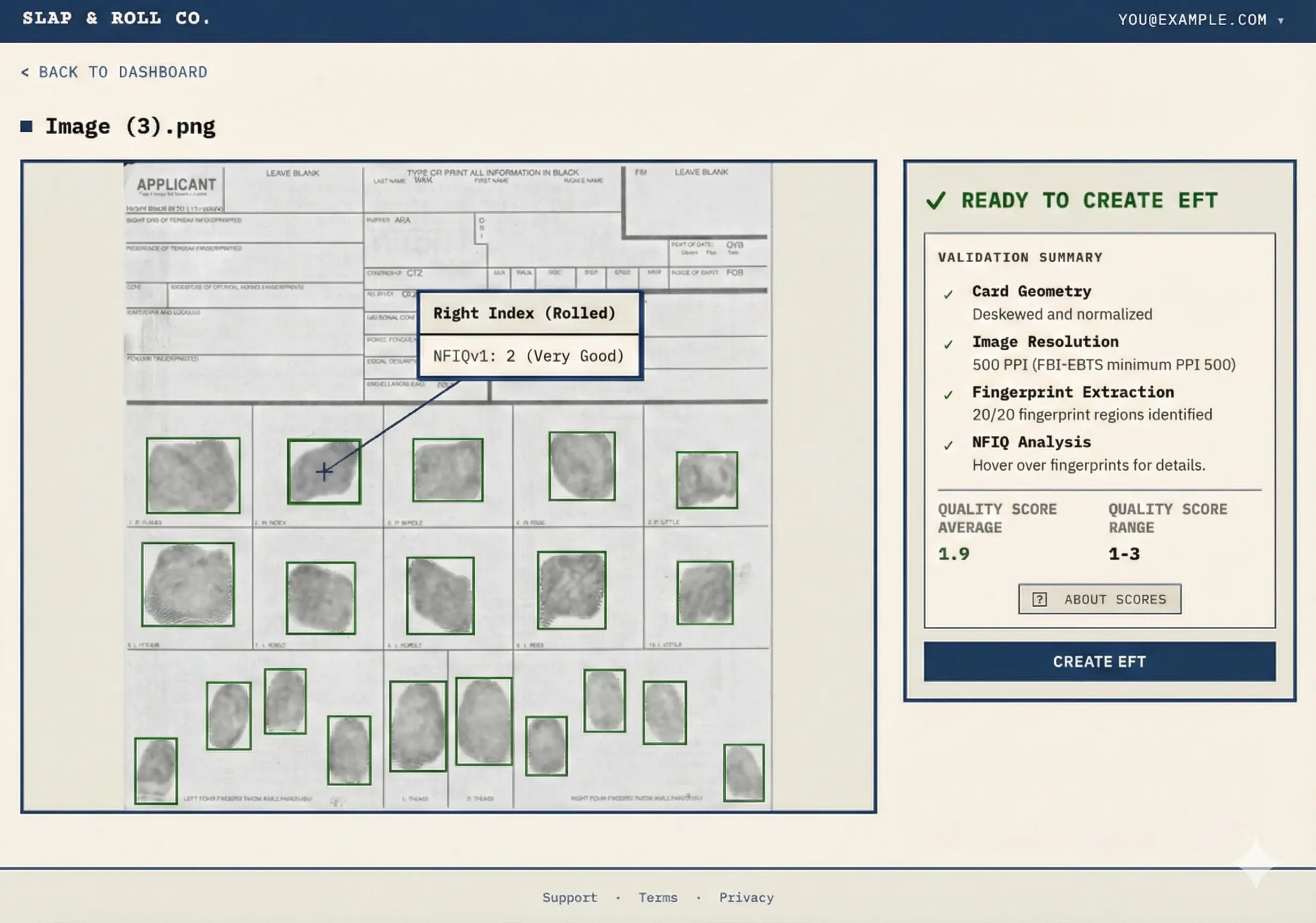
If the Create EFT button is active, the software successfully detected all twenty prints and the scan is ready. If it is disabled, a print may have been missed or the card is poorly aligned; adjust and re-upload the scan.
This quality check is free and lets you identify issues before the customer leaves. While the ATF eForms portal currently accepts all quality ranges, aim for clean prints to prevent FBI database matching delays.
See also: understanding NFIQ scores and what they mean for ATF eForm submissions.
Enter biographic details and download the EFT file
Click Create EFT to start the Privacy Vault wizard. Either your staff can collect and enter the customer's biographic information (Name, DOB, Sex, Race, POB, and SSN), or you can turn the screen or tablet over to the customer to enter their own details.
To protect customer privacy, the biographic data is processed entirely in the browser. Once the fingerprint images are loaded, the file is compiled locally on your device. No personal information or SSN is sent to our servers.
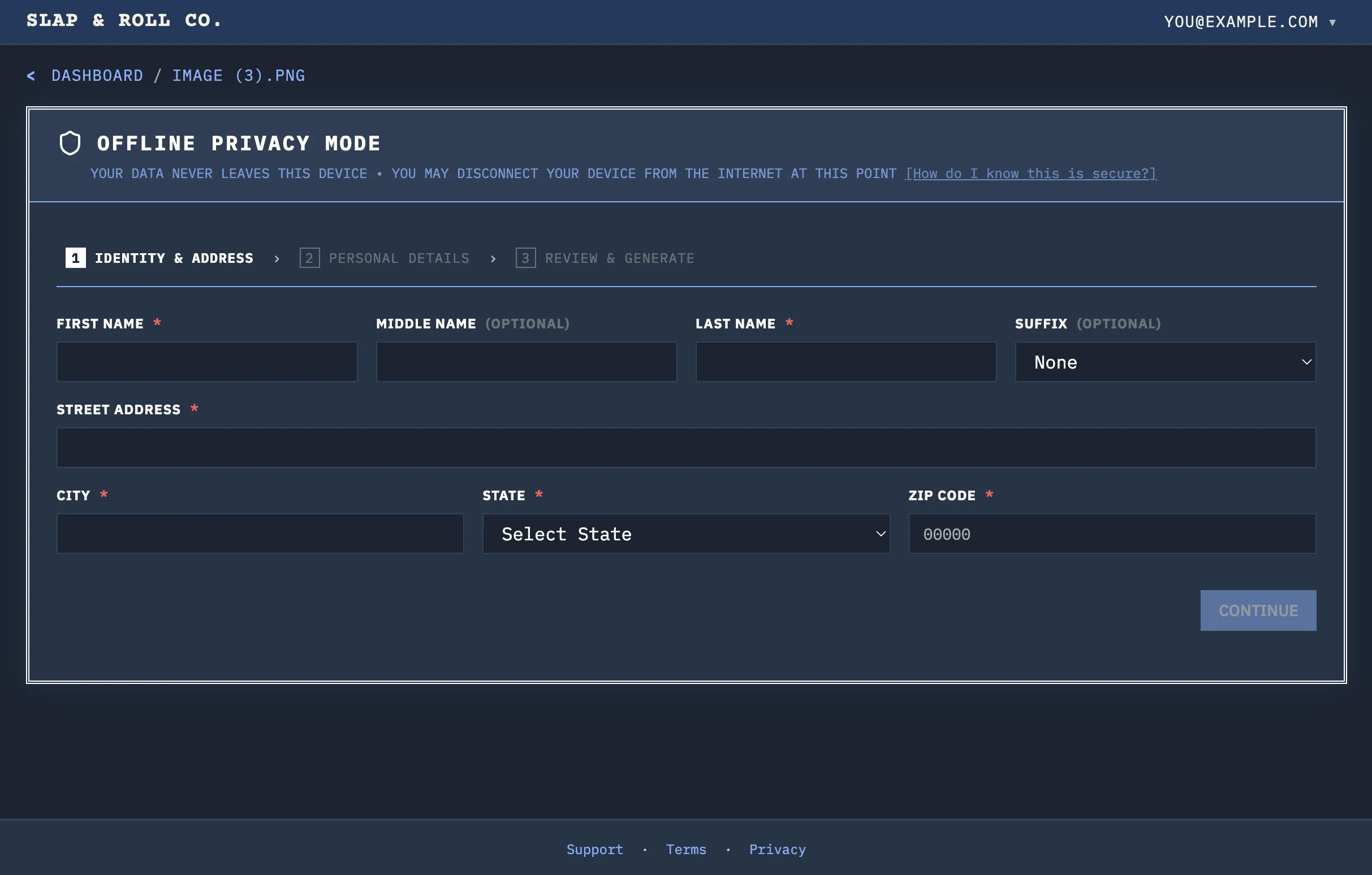
The wizard guides the user through entering their details:
Stop 1. Identity and demographics: Full name, date of birth, sex, race, and place of birth.
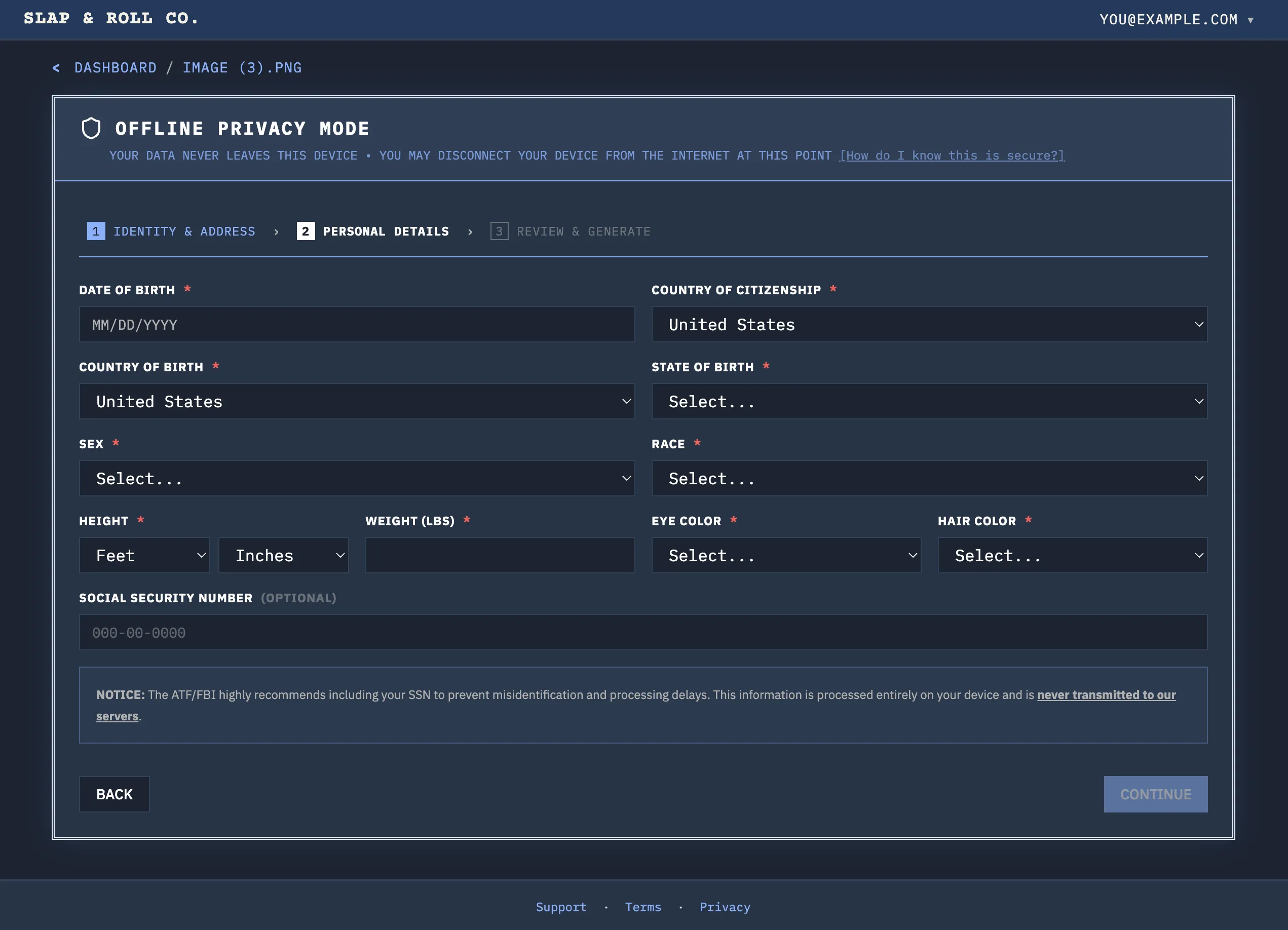
Stop 2. SSN: Used to prevent background check delays. The input is masked by default for privacy.
Stop 3. Review and download: Verify the entered data and download the finalized `.eft` files.
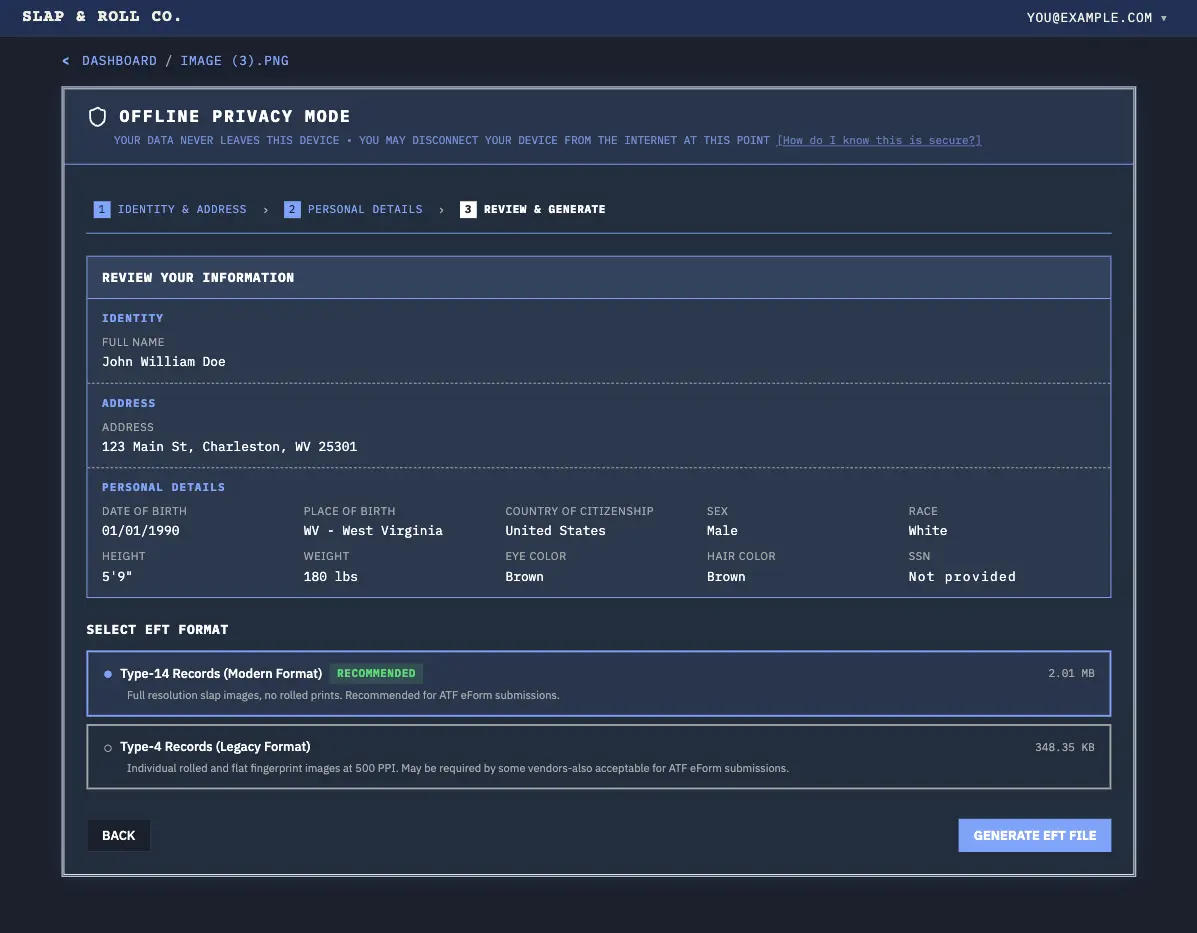
The customer receives both Type-14 and older Type-4 formats. These files are ready to be saved and uploaded directly to their ATF eForm application before they leave your store.
Keep the sale in-house (without the kiosk cost)
Sending a customer elsewhere for fingerprinting introduces friction. If they leave your store to find a livescan location, the NFA sale pauses—and some customers may not return. Keeping the entire transaction in-house maintains momentum.
With SLAP & ROLL, you can provide an end-to-end NFA service at your counter:
- No upfront hardware investment. Any standard flatbed scanner or office multi-function printer (MFP) capable of 600 DPI works.
- Same-day submission. The EFT file is ready in minutes, allowing the customer to submit their eForm before leaving.
- Capture more walk-ins. Offer standalone fingerprint-to-EFT conversion for DIY eForm 1 filers (making their own SBRs or suppressors), driving high-margin foot traffic to your store.
Low volume: If you process a few NFA transfers a month, expensive kiosk hardware is impossible to justify. With SLAP & ROLL, keeping even a single NFA sale in-store pays for the service.
No livescan nearby: If there are no livescan locations near your shop, you become the primary provider for NFA services in your area, giving you an edge over competitors.
No vendor lock-in: Unlike kiosk systems that bind you to a specific transfer process or distributor, you retain full ownership of the customer relationship.
See also: How to convert an FD-258 to an EFT file - the consumer-facing walkthrough with screenshots.
How to price your service
Price this however makes sense for your shop. Common models:
| Model | What you charge | When it works best |
|---|---|---|
| Flat fee | $25–50 per conversion | Most common. Simple and transparent. Works for in-house prints and customer-supplied cards. |
| Walk-in card service | $15–25 for customer-supplied cards | Lower price since you're not supplying cards or ink. Great for walk-in traffic (including eForm 1 builders). |
| Bundled with transfer | Free with NFA purchase | Incentivizes buying from you instead of online. Treats EFT as a customer-acquisition cost. |
| Membership perk | Free for range or club members | Drives recurring membership revenue. |
Comparison: your options for offering EFT service
| SLAP & ROLL Pro | Hardware kiosk | Third-party service | |
|---|---|---|---|
| Upfront cost | $0 | $2,000–5,000+ | $0 |
| Per-file cost | $0 (unlimited) or $20 (Pay-As-You-Go) | $0–40 | $30–85 (customer pays) |
| Turnaround | Instant | Instant (in-store) | 30 min – 3 business days |
| File eForm same visit? | Yes | Sometimes (vendor dependent) | No - must return |
| Quality check included? | Yes, free | Varies | Usually no |
| Customer data stored externally? | No - browser-only | Yes | Yes (days to weeks) |
| Vendor lock-in? | No | Often yes | No |
See the full breakdown: How to Get an EFT File for ATF eForms: All Options Compared.
Ready to start offering EFT files in your shop? See dealer pricing.